AIEnhance.io
AI Outfit Changer

No photo? Try one of these

AI Outfit Changer

Upload a photo, pick an outfit and see yourself in it in seconds. Your face, pose and body stay the same, only the clothes and background change.

More than 2M+ users trust us

✓Works in your browser
◈20 free credits
◎No watermarks
⚡Instant results

How the AI Outfit Changer Works in 4 Simple Steps

No fitting room, no photoshoot. Upload a photo, choose the clothes and let the AI dress you.

🖼️

Upload a photo and pick your first outfit

Try It Free →

Same Person, New Outfit and Location

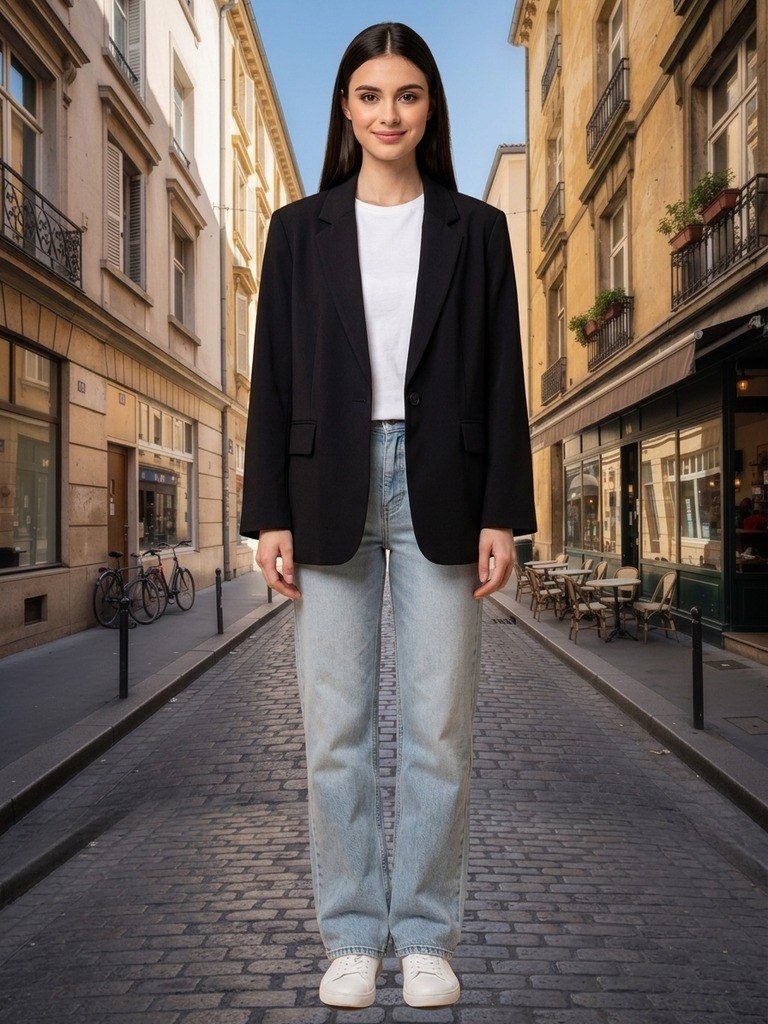
One photo in a plain t-shirt became a street-style look with a black blazer, in one click. Drag the slider to see the difference.

Photo enhancement before and after — AfterBeforeAfter

What Makes Our AI Clothes Changer Different

Realistic try-ons that keep the person recognisable, with full control over clothes and background.

1

Your face and pose stay the same

The AI changes only the clothes and, if you want, the background. Face, hairstyle, body shape and pose are kept, so the result still looks like you.

2

Realistic fit and fabric

Clothes follow the body with natural folds, shadows and lighting that matches the scene, instead of looking pasted on top of the photo.

3

Any clothes, not just presets

Twenty ready-made looks cover the basics, and you can upload a photo of any garment, from a store listing to a jacket from your own wardrobe.

4

A full editor around it

After the try-on, keep editing with prompts, apply photo effects, remove objects or crop the image for Instagram, all in the same workspace.

Outfits & backgrounds

Ready-Made Looks, or Upload Any Clothes You Like

Pick from ten women’s and ten men’s outfits, from sportswear and hoodies to suits and evening dresses, or upload a photo of any garment: a product from an online store, a jacket from your wardrobe or a look from a magazine.

Then keep the original background, let the AI choose one that fits the outfit, pick one of twelve locations or upload your own. Add a short prompt for details such as colours, accessories or the weather.

Try an Outfit Free →
Ready-made outfits20
Background scenes12
Your own clothes and backgroundsUpload
Price per try-on10 credits
Result time~15 seconds

One Click, New Look

Typical ways people use the AI outfit changer.

"Grey suit with a white shirt, modern office background."

Professional photo for LinkedIn or a CV

Outfit: Grey Suit · Background: Modern Office

"Black satin evening dress, city lights at night."

Trying a look before a party

Outfit: Evening Dress · Background: City Night

"My own photo of a denim jacket from an online store."

Checking clothes before you buy

Outfit: Upload · Background: Original

An AI Outfit Changer That Keeps You Looking Like You

AIEnhance.io is an online ai outfit changer that lets you see yourself in different clothes without a fitting room or a photoshoot. Upload a photo, pick an outfit and the ai clothes changer dresses you in it in about fifteen seconds. A plain t-shirt becomes a tailored suit, a hoodie becomes an evening dress, and a studio shot becomes a street-style photo in a European city.

The difference from a simple filter is that the person stays the same. Your face, hairstyle, body shape and pose are kept, and only the clothes, and the background if you want, are changed. The new outfit follows your body with natural folds and shadows, and the light on the fabric matches the scene, so the result looks like a real photo rather than a collage.

Everything runs in the browser on a computer or a phone. There is nothing to install and no account needed to look around, and new accounts get free credits to try several outfits.

Ready-Made Outfits for Women and Men

To make the first try-on effortless, the outfit changer comes with twenty ready-made looks. For women there are sportswear, a casual striped shirt, a sand-coloured lounge set, a retro rugby shirt, an oversized forest-green hoodie, a polka dot skirt, a grey suit, a casual blazer with jeans, a linen summer dress and a black evening dress. For men there are sportswear, an oxford shirt with chinos, a denim jacket, a rugby shirt, a hoodie, a navy suit, a light grey three-piece suit, a leather biker jacket, a linen summer set and a cable-knit sweater.

Each preset is shown as a clean product photo, so you can see exactly what you will be wearing before you press Generate. Switch between the women’s and men’s lists at any time, and try several looks on the same photo to compare them side by side in the version history.

Change Clothes in a Photo With Any Garment You Like

Presets are only the start. Choose Upload in the outfit list and add a photo of any piece of clothing or a complete outfit, and the AI will dress the person in it. This is the fastest way to answer the question every online shopper has: how would this actually look on me?

Product photos from online stores work especially well, because the garment is shown clearly on a plain background. You can also photograph a jacket from your own wardrobe, use a look from a magazine or a social media post, or combine a preset with a short prompt such as "make the jacket burgundy" or "add a silver necklace" to fine-tune the result.

New Background in the Same Step

A new outfit often calls for a new setting, so the background is part of the same edit. Keep the original background when you only want to see the clothes. Choose Auto and the AI picks a realistic setting that suits the outfit, for example an office for a suit or a beach for a summer dress.

You can also pick one of twelve locations: a soft white or blue studio backdrop, a warm brown backdrop, a coffee shop, a fashion runway, a professional photo studio, a sunny bedroom, a modern office, a city waterfront at night, a European street, a green park or a sunny beach. Or upload your own background photo, and the person in the new outfit will be placed into it with matching light.

What People Use the AI Clothes Changer For

Online shoppers use it to try clothes before they buy and to avoid returns, by uploading a product photo and seeing it on themselves. Job seekers turn a casual selfie into a professional photo in a suit for LinkedIn or a CV, without booking a photographer. People planning a wedding, a party or a holiday preview different looks and settings before they decide what to pack or wear.

Online sellers and small fashion brands show one garment on different models and in different scenes for their product pages and ads. Content creators produce fresh outfit ideas for posts and thumbnails in minutes, and stylists use it to show clients a few options before a real fitting. And for many people it is simply fun: seeing yourself in a style you would never normally try.

Tips for the Most Realistic Results

Start with a sharp, well-lit photo of one person. Full-body or half-body shots work best because the AI can see the whole outfit area, and a natural standing pose gives the cleanest fit. Avoid very dark photos, heavy beauty filters and group photos, and make sure arms or bags do not cover most of the clothes.

When you upload your own garment, use a clear photo of the item on a plain background, ideally a flat lay or a product shot. Keep prompts short and concrete: "dark green", "with white sneakers" or "rainy evening" works better than a long description. If the first result is close but not perfect, generate again or add one detail to the prompt; every attempt is saved as a separate version you can compare.

More Than a Virtual Try-On

The outfit changer is one tool inside a full AI photo workspace. Once you have the new look, you can keep editing it with the AI Photo Editor by describing any change in words, remove the background for a transparent PNG, erase objects or people, apply one of ten photo effects such as Golden Hour or Cinematic, sharpen and upscale the image, and crop it for Instagram, a story or a banner.

Every step creates a new version, so you can go back to the original or branch into a different outfit at any time. Removal tools and photo effects cost no credits.

Private, Fast and Free to Start

Your uploads are used only to create your result. They are never sold and never used to train AI models. Most try-ons are ready in about fifteen seconds.

New accounts get 20 free credits, enough for two try-ons, and each further try-on costs 10 credits. One-time credit packs and monthly plans are on the pricing page. Upload a photo above and try your first outfit now.

Common Questions Answered

Everything you need to know before your first virtual try-on.